m>notes notepad
★ New awesome dark theme for creative notes writers
★
★You can now easily backup your notes to Dropbox or SD-card
★m> notes is designed to be convenient to use and makes it easy to focus on what's important - your notes' content and context.
Slide navigation and Android Action Bar (enabled even for v2.3 devices) allow you to browse your collection of notes quickly and without much effort.
Use beautiful icons and notebook colors to add flavor to your collection of notes.
Key Features:- Consistent sliding navigation- Organize your notes and sub-notes into colored notebooks- Add photos to your notes, make photos with your camera or choose a picture from the gallery- Action Bar provides context information even on older devices- Drag and drop to reorder notes- Share your notes via Twitter, Facebook, email, etc.- Backup to Dropbox- Backup to SD-card
Premium Features:- Widgets- 9 fonts to choose from- Additional icons- Unlimited notebooks- Imports notes from the free version
With m>notes notes and notebooks you can:
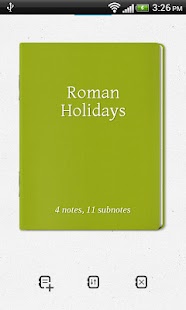
**Organize your notes into colored notepadsPick vivid colors for your bright ideas and memories.
Select color for every notepad.
**Slide through your notes and notepadsSlide left and right to navigate through your notebooks and notes.
m>notes is the first android notebook with consistent sliding navigation.
**Reorder notes in every notepad with easeDrag and drop your notes to order logically.
m>notes inserts your new notes at the top or at the bottom of the list depending on your preferences.
Then you may drag and drop it anywhere in the list.
**Share your notesm>notes allows you to share notes from your notepad with your friends via Twitter, Facebook, Email, SMS or any other sharing tool.
**Select beautiful fontm>notes has 8 beautiful rare fonts and also features exclusive handwritten Kolbaska font that improves remembering
**Label important thingsMark important things with color icons.
Every note may have its own icon.
**Note everythingCreate many colored notepads and make notes just about anything.
**Import notes from free version Switch to the paid version and import all your notes in one tap.
About m>notes notepad
- Package name (App ID)
- com.devmiles.mnotes
- Available on
- Google Play
- Price
- Free
- Developer
- Apalon Apps
Looking for the m>notes notepad APK?
The safest way to get m>notes notepad (com.devmiles.mnotes) on your Android device is to install it directly from Google Play — you'll always get the latest official version, automatic updates, and no risk of modified or infected APK files from third-party sites.
Social Features
Connect and share with friends and the community.
Camera Features
Advanced camera features with editing capabilities.
Food & Dining
Discover recipes and order food from your favorite restaurants.
See m>notes notepad in Action


Frequently Asked Questions
Is m>notes notepad free?
Yes, m>notes notepad is free to download and install on Android through Google Play.
How do I install m>notes notepad on Android?
Open Google Play on your Android phone or tablet, search for m>notes notepad by Apalon Apps or tap the Google Play button on this page, then tap Install. The app downloads and installs automatically.
What is com.devmiles.mnotes?
com.devmiles.mnotes is the App ID (package name) of m>notes notepad on Google Play. Every Android app has a unique package name, and it is the safest way to verify you are installing the official app.
Is m>notes notepad safe to download?
Installing m>notes notepad from Google Play is the safest option: you get the official version published by Apalon Apps, verified by Google Play Protect, with automatic updates. Avoid APK files from unofficial third-party sites.
Get m>notes notepad Today
m>notes notepad for Android — free download on Google Play.
Compatible with Android phones and tablets — available on Google Play.
Ask AI about this app
Get instant answers about features, tips and more from popular AI assistants.